

Approval policies
Consensus is the approval step that stops a tool call so a user can review it before it runs. Which tools get that step is a policy you set as an operator: you mark the tools that change state — cancels, updates, deletes — and leave read-only tools to run freely. This page covers turning approval on from the admin portal. For the field-by-field rule contract and what the user sees when a gated tool fires, see Gate state-changing tools behind Consensus.
Turn on approval per tool
Section titled “Turn on approval per tool”Approval is configured on the MCP instance, on its Approval Configuration page. Add the tools you want gated and, for each, describe the action enough that the review prompt is meaningful — the operation it performs, the kind of record it touches, and a companion read tool to show a before/after view on updates. The Consensus contract covers exactly what each field does.
There is no separate “approval on/off” master setting to remember: approval is on for a tool when a rule exists for it. Add a tool to the list and it is gated; remove it and it runs freely again. The page’s top-level toggle simply reflects whether any tool is currently gated.
Let DioscHub find the tools to gate
Section titled “Let DioscHub find the tools to gate”You do not have to know your whole tool catalog by heart. The Approval Configuration page shows a
Suggested Approval Gates list: tools DioscHub believes change state, each tagged with why it was
flagged — either an MCP annotation your server
declared (destructiveHint, readOnlyHint) or a heuristic on the tool’s name. Add a suggestion to gate
that one tool, or apply the whole list at once.
Suggestions never gate anything on their own — they are candidates. A tool is gated only once you save it into the policy. Declaring accurate annotations on your MCP server makes the right tools surface here, but the decision to gate always stays with you.
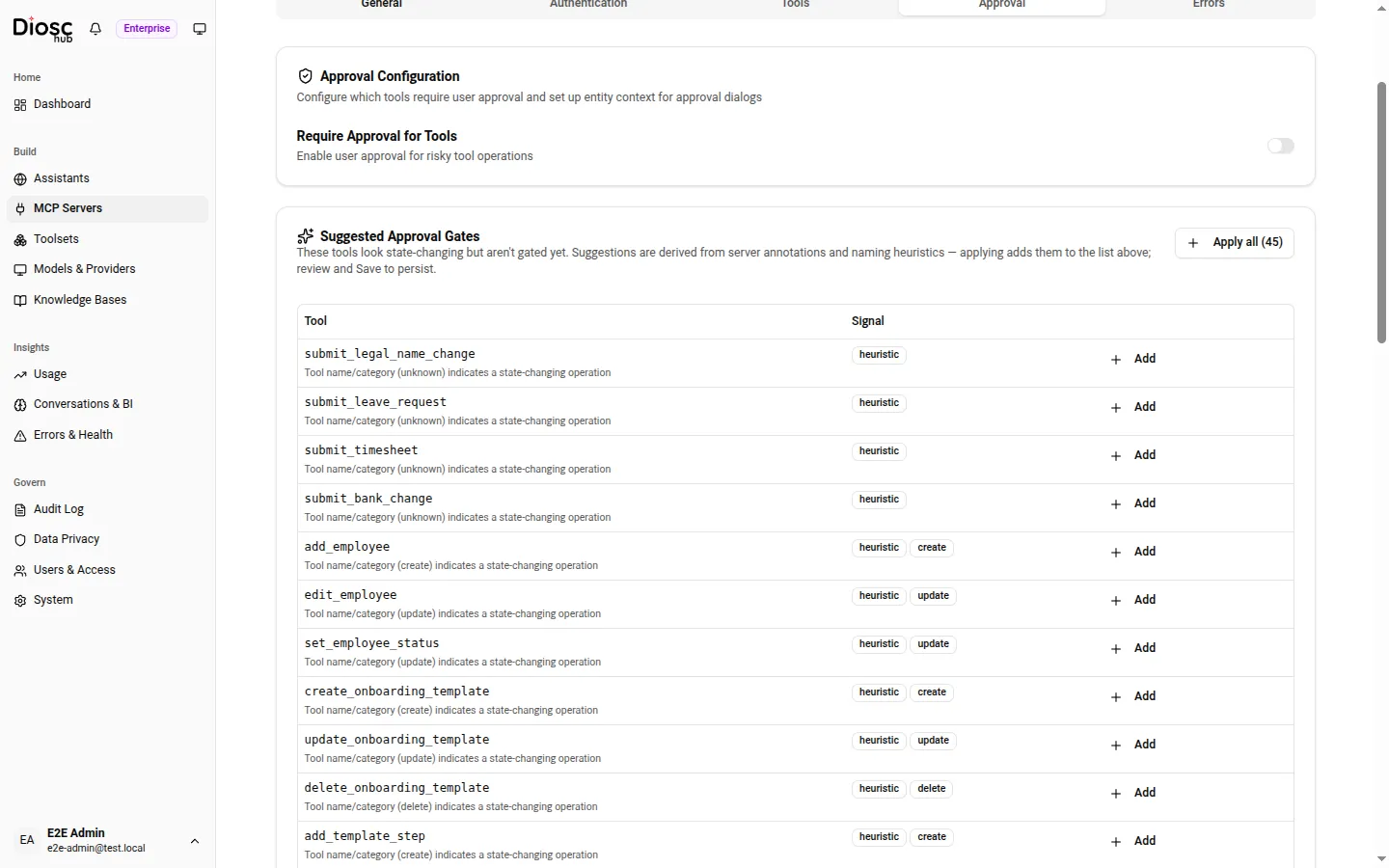
The Approval Configuration tab. Require Approval for Tools turns gating on, and Suggested Approval Gates surfaces the tools worth gating so you can add them one at a time or all at once.
The gate applies to every session that reaches the tool
Section titled “The gate applies to every session that reaches the tool”An approval policy is a property of the tool, not of a Role or an Assistant. Once you gate a tool, any session that is allowed to call it gets the approval step — there is no Role that bypasses it and none that adds one. Scope who can call a tool with Roles; use approval policy to decide which tools must be reviewed before they run. The two compose: a tool a Role cannot call is never reached, and a gated tool a Role can call pauses at the approval step before it runs.
Saving a policy change takes effect immediately — DioscHub applies the updated gate to the instance’s tools without a restart, so the next call to that tool is already governed by your change.
Next: return to the Admin configuration overview, or read the Consensus contract for the developer-side detail.