

Gate state-changing tools behind Consensus
A read tool can run freely; a tool that changes state — cancels an order, updates a record, deletes a row — should not run until the user has seen it and agreed. Consensus is the approval step that makes that happen. When a gated tool is about to run, DioscHub pauses the turn and shows the user an approval prompt — the tool does not run while the user is deciding.
Gate a tool by configuring an approval rule
Section titled “Gate a tool by configuring an approval rule”A tool is gated when an approval rule exists for it. You set the rule per tool on the MCP
instance, in the admin portal or over the admin API at
PUT /admin/mcp-instances/:name/approval-metadata:
{ "toolsRequiringApproval": [ { "toolName": "cancel_order", "operationType": "delete", "entityType": "order", "entityIdParam": "orderId", "companionTool": "get_order" } ]}Each field shapes what the user sees:
| Field | Purpose |
|---|---|
toolName | The bare tool name to gate. Its presence here is what turns the gate on. |
operationType | create, read, update, or delete — frames the action in the prompt. |
entityType | The kind of thing being acted on (order), for the prompt. |
entityIdParam | Which tool argument holds the target’s id. |
companionTool | A read tool that fetches the target’s current state, so the prompt can show a before/after diff (see below). |
parameterMapping | Maps raw argument names to readable labels in the prompt. |
Saving the rule takes effect immediately — DioscHub re-registers the instance’s tools so the gate applies on the next call, with no restart.
What the user sees, and what they can do
Section titled “What the user sees, and what they can do”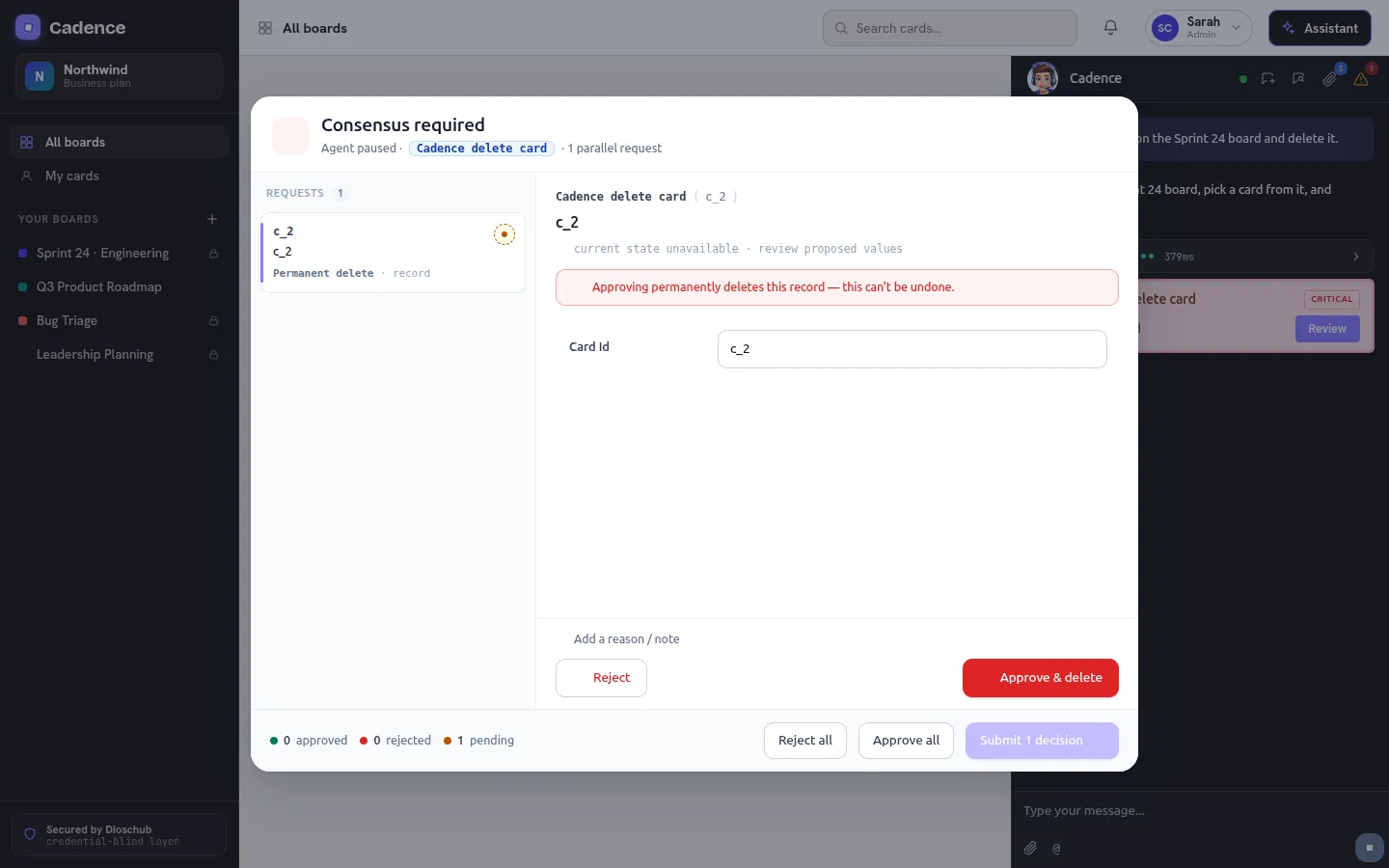
The built-in consensus dialog. The assistant is paused on a gated delete_card; the user reviews the request — here flagged as a permanent delete — and rejects, edits, or approves it before it runs.
When the model calls a gated tool, DioscHub raises an approval prompt before the tool runs. For each call, the user can:
- Approve — the call runs exactly as proposed.
- Edit — the user changes the arguments, and the call runs with the edited values. DioscHub validates the edited arguments against the tool’s input schema; an edit that does not validate is rejected rather than run.
- Reject — the call does not run. The model is told it was rejected and not to retry it.
For an update or delete with a companionTool configured, DioscHub calls that read tool first to
fetch the target’s current state and shows a before/after diff in the prompt — so the user reviews
the actual change, not just the raw arguments.
Parallel calls are grouped, not stacked
Section titled “Parallel calls are grouped, not stacked”When the model makes several gated calls at once, DioscHub groups them by tool name and raises one
prompt per group. Five create_card calls and three update_card calls become two prompts — one modal
per tool, each listing all its calls — not eight separate popups. Non-gated calls in the same batch run
without interruption.
Every decision is written to an audit trail
Section titled “Every decision is written to an audit trail”Each approval decision — approved or rejected — is written as it happens to an append-only audit trail
(approval_logs), recording the tool, the operation, and the outcome. The record is
Credential Blind: it never captures the user’s forwarded auth.
Let DioscHub suggest which tools to gate
Section titled “Let DioscHub suggest which tools to gate”You do not have to guess which tools change state. If your MCP server
declares MCP annotations — destructiveHint: true or readOnlyHint: false — DioscHub uses them (and a
name heuristic) to suggest tools that look state-changing. Fetch the suggestions from the instance’s
approval-suggestions endpoint and apply the ones you want.
Suggestions are advisory and additive: DioscHub never gates a tool automatically from an annotation. A tool is gated only once an admin writes the approval rule. Declaring the hints on your server is good practice — it makes the right tools easy to find — but the decision to gate stays with the operator.