

Model routing
An Assistant normally runs every turn on the single model in its llmConfig. Model routing replaces that
with a per-turn choice: the hub picks one model from a set of candidates you register on the Assistant,
decided fresh at the start of each turn. A one-line “thanks” and a 60k-token tool-heavy planning request no
longer hit the same model. The decision serves three ends — sending cheap turns to a cheaper model,
sending large or tool-heavy turns to a stronger one, and falling to a second model when the first fails.
Routing decides once per turn, at turn start. It does not switch models between messages or mid-turn
tool loops. When routing is off, the single model in llmConfig handles every turn, byte-for-byte the
existing path.
Prerequisites
Section titled “Prerequisites”- At least two registered models. Routing chooses among a candidate set, so you must have registered more than one model in the catalog. Register them on the Models page.
multipleModelConfigsis itself a Pro capability — registering more than one model is what makes routing possible, and routing (intelligentModelRouting) depends on it. Both sit at Pro. See Licensing & tiers.
Configure routing on the Assistant
Section titled “Configure routing on the Assistant”Routing config lives on the Assistant’s Setup settings tab, in the Route Between Models card. It is
stored as an optional routingConfig block on the Assistant. Absent or disabled, the Assistant uses its
single llmConfig model as before.
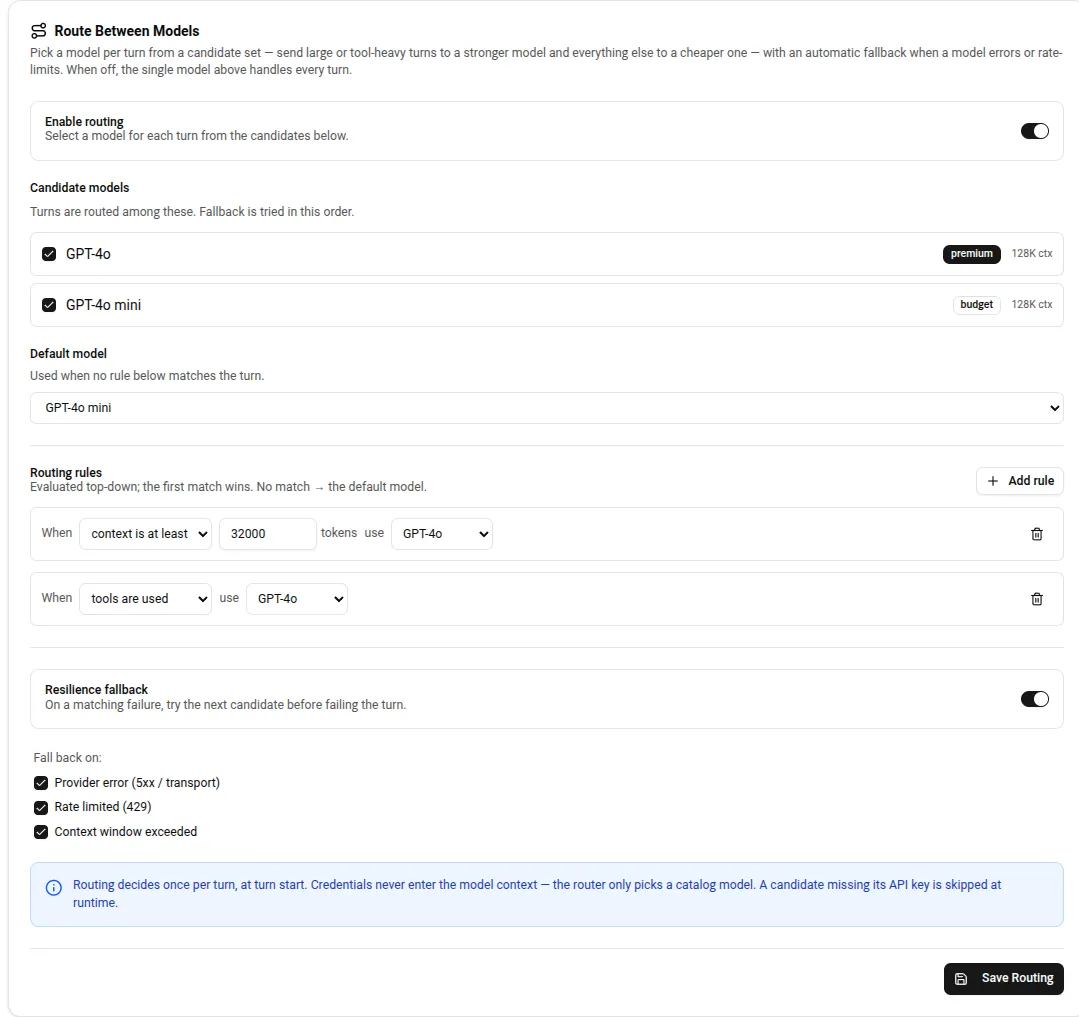
The Route Between Models card, expanded, on an Assistant’s Setup tab.
Enable routing
Section titled “Enable routing”Toggle Enable routing. Routing requires at least two candidate models selected below — the card rejects a save with fewer.
Candidate models
Section titled “Candidate models”Under Candidate models, check the models this Assistant may route among. Each row shows the model’s
category badge (premium, standard, or budget) and its context-window size, both drawn from the
catalog. A model with no provider API key resolved shows a No API key badge; it is skipped at runtime
rather than surfaced to the user. The order you list candidates in is also the fallback order (below).
Default model
Section titled “Default model”Pick a Default model from the candidates you selected. This is the model used when no routing rule matches the turn. The default must be one of the selected candidates.
Routing rules
Section titled “Routing rules”Rules are evaluated top-down, first match wins. No matching rule means the turn uses the default model.
Add a rule with Add rule. Each rule has a condition and a target model (use), which must be one of
your candidates:
| Condition | Fires when |
|---|---|
| context is at least | The turn’s estimated input context is at least the token threshold you enter. |
| tools are used | Any tools are bound to the model for this turn. |
A rule whose target model is no longer a candidate is skipped, and evaluation continues to later rules; if nothing resolves, the turn falls back to the default and then, defensively, to the first candidate.
Resilience fallback
Section titled “Resilience fallback”Toggle Resilience fallback to have the hub try the next candidate when a model call fails mid-turn, rather than failing the turn. The candidates are tried in the order they are listed. Choose which failures trigger a fallback under Fall back on:
| Trigger | What it catches |
|---|---|
| Provider error (5xx / transport) | Provider 5xx responses, timeouts, and transport failures. |
| Rate limited (429) | Provider 429 responses and rate-limit / quota-exceeded messages. |
| Context window exceeded | The input exceeds the chosen model’s context window. |
The hub classifies each failure. If the failure matches an enabled trigger and another candidate remains, it retries the call on the next candidate; if the failure is not a recognized trigger, it is re-raised and the turn fails. This is a resilience path, separate from the “intelligent” size/tools selection above — it is useful even when your rules are simple.
Save with Save Routing.
What the router does not do
Section titled “What the router does not do”Two things named in the design are deliberately not shipped:
- Classifier routing (a small fast model that reads the turn and picks a target) is designed but not built. The only selection strategy today is the rule set above.
- A reasoning-based rule is reserved in the config schema but has no per-turn detector, so it is not offered in the card. The two conditions you can configure are context size and tool use.
How selection stays credential-blind
Section titled “How selection stays credential-blind”The router chooses a catalog model id and nothing else. Credentials are resolved server-side per model, exactly as for a single-model Assistant — the router never sees or moves an API key, and none of the routing signals or decisions enter the model context. Every routing decision is recorded as ids and rule names only (the chosen model, the matched rule or default, and on fallback the trigger and substitute), consistent with the credential-blind boundary.
Related: Models · Assistants & Roles · Licensing & tiers